クレカ追加手順
クレジットカードの追加登録手順/Procedure for adding a credit card
- クレジットカードの追加登録の手順をご案内いたします。最初に予約サイトを開いて下さい。
- This guide explains how to add a credit card. First, open the reservation site.
- 신용카드 추가 등록 절차를 안내해 드립니다. 먼저 예약 사이트를 열어주세요.
- 为您介绍新增信用卡的登记流程。请先打开预约网站。
- 為您介紹新增信用卡的登記流程。請先開啟預約網站。
登録したカードの予約への紐付けについて/Linking a registered card to a reservation
- 登録したカードの予約への割当はマイページでは対応していません。サイト運営側で対応いたしますので、お問い合わせください。
- Please note that linking a registered card to a reservation is not supported on My Page. Please contact the site operator, who will handle it on your behalf.
- 또한, 등록한 카드를 예약에 연결하는 기능은 마이페이지에서 지원되지 않습니다. 사이트 운영 측에서 처리해 드리오니 문의해 주시기 바랍니다.
- 另外,将已登记的信用卡与预约关联的功能,我的页面尚不支持。将由网站运营方为您处理,请联系我们。
- 另外,將已登記的信用卡與預約關聯的功能,我的頁面尚不支援。將由網站營運方為您處理,請與我們聯繫。
予約サイトのURLについて / About the reservation site URL
※本システムは日本の各地域で採用されており、それぞれの地域ごとにサイトのURLが異なります。お客様が利用されているサイトで操作してください。 ※This system is used in various regions across Japan, and the site URL differs by region. Please operate on the site you are using. ※본 시스템은 일본 각 지역에서 채택되어 있으며, 지역별로 사이트 URL이 다릅니다. 고객님이 이용하시는 사이트에서 조작해 주세요. ※本系统在日本各地区均有采用,各地区的网站URL不同。请在您所使用的网站上进行操作。 ※本系統在日本各地區皆有採用,各地區的網站URL不同。請在您所使用的網站上進行操作。
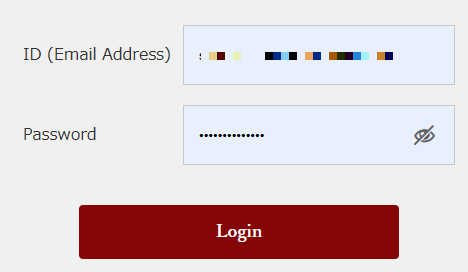
ログイン / Login
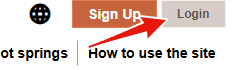
- 画面右上からログインします。
- Log in from the top right of the screen.
- 화면 오른쪽 위에서 로그인합니다.
- 从画面右上角登录。
- 從畫面右上角登入。
マイページから操作メニューを表示 / Display the operation menu from My Page
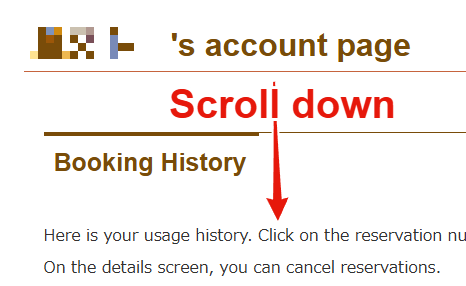
- マイページのトップ画面を下にスクロールして操作メニューを表示します。
- Scroll down the My Page top screen to display the operation menu.
- 마이페이지 상단 화면을 아래로 스크롤하여 조작 메뉴를 표시합니다.
- 向下滚动我的页面顶部画面以显示操作菜单。
- 向下捲動「我的頁面」頂部畫面以顯示操作選單。
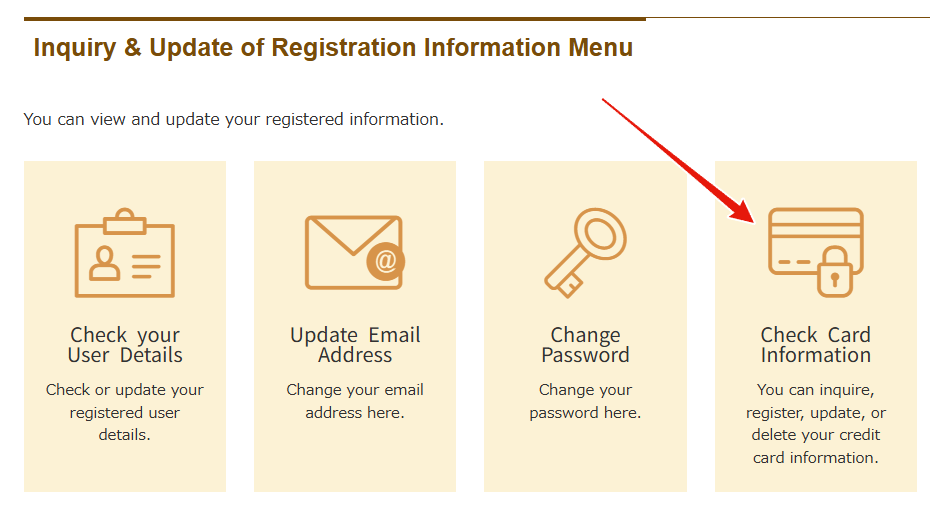
登録カード照会画面の表示 / Display the registered card inquiry screen
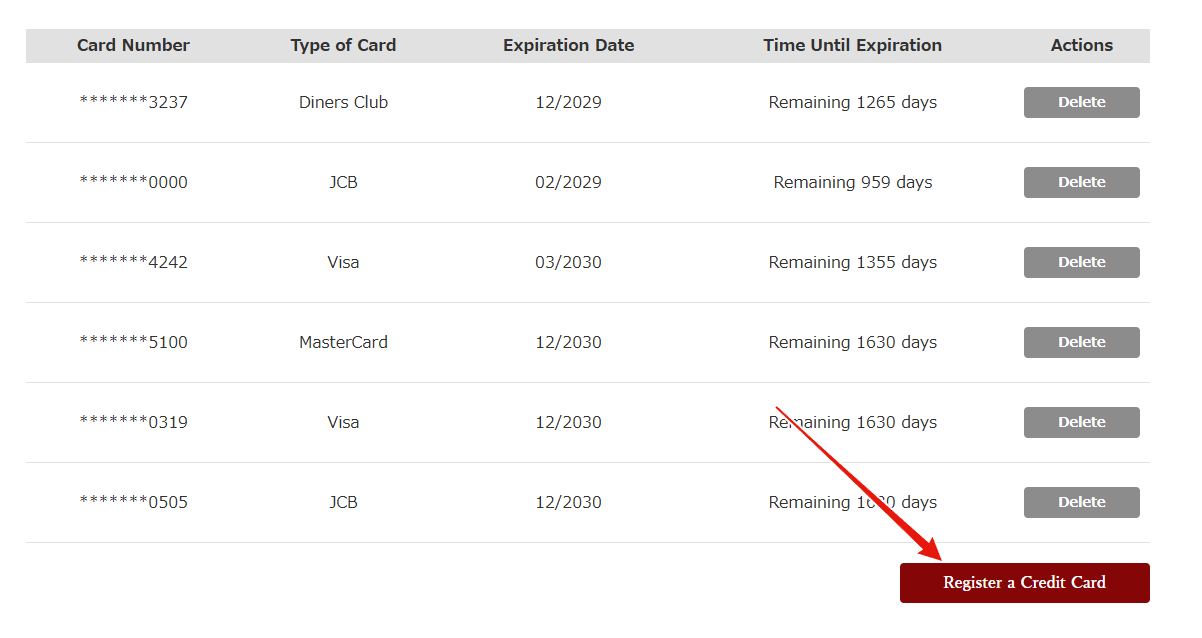
登録カードの追加 / Add a registered card
- 一覧の右下にある「Register a Credit Card」ボタンを押してください。
- Press the "Register a Credit Card" button at the bottom right of the list.
- 목록 오른쪽 아래에 있는 "Register a Credit Card" 버튼을 눌러주세요.
- 请点击列表右下方的“Register a Credit Card”按钮。
- 請按下清單右下方的「Register a Credit Card」按鈕。
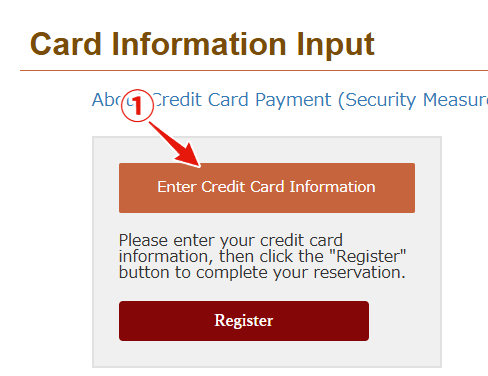
カード情報入力の開始 / Start entering card information
- 新しいカード情報の登録を開始します。最後に必ず「登録/Register」ボタンを押してください。
- Start registering new card information. Be sure to press the "登録/Register" button at the end.
- 새로운 카드 정보 등록을 시작합니다. 마지막에 반드시 「登録/Register」 버튼을 눌러주세요.
- 开始注册新的信用卡信息。最后请务必点击「登録/Register」按钮。
- 開始註冊新的信用卡資訊。最後請務必按下「登録/Register」按鈕。
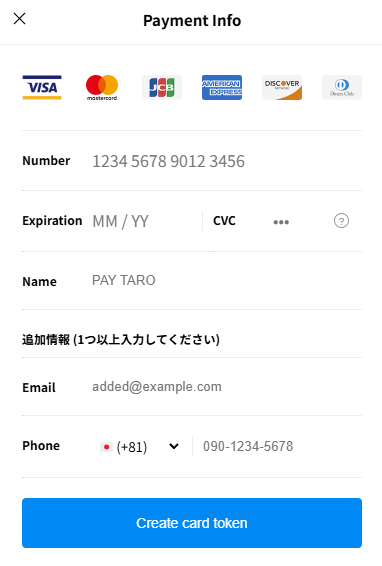
カード情報を入力 / Enter card information
- 新しいカード情報を入力します。SMSもしくはメールでの本人確認が必要です。
- Enter the new card information. Identity verification via SMS or email is required.
- 새로운 카드 정보를 입력합니다. SMS 또는 이메일을 통한 본인 확인이 필요합니다.
- 输入新的信用卡信息。需要通过短信或邮件进行身份验证。
- 輸入新的信用卡資訊。需要透過簡訊或電子郵件進行身分驗證。
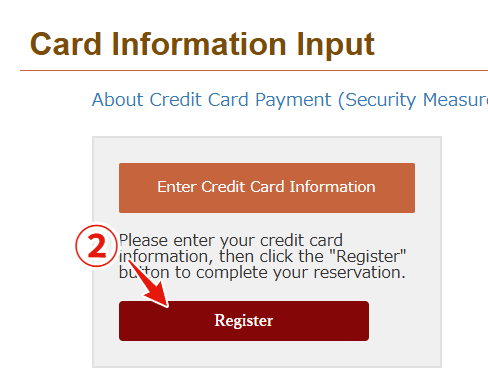
カードの登録 / Register the card
- 最後に「登録/Register」ボタンを押して登録完了です。
- Finally, press the "登録/Register" button to complete the registration.
- 마지막으로 「登録/Register」 버튼을 누르면 등록이 완료됩니다.
- 最后点击「登録/Register」按钮即可完成注册。
- 最後按下「登録/Register」按鈕即可完成註冊。
登録したカードの予約への紐づけ/How to link a registered card to a reservation
- なお、登録したカードの予約への紐付けはマイページでは対応していません。サイト運営側で対応いたしますので、お問い合わせください。